
What We Learned from Building a Custom AI Workflow Engine
Lessons from building custom AI workflows around real company processes — templates, review rules, upload logic, and the output formats teams actually use.
2026-05-14 · 10 min read
Introduction
Custom AI projects often start in the wrong place. Teams begin with a model, a prompt, or a chat interface — and only later discover that the hard problem is not generation. The hard problem is fit: how the output matches the company's process, templates, review habits, and internal handoff.
After building custom AI workflows across procurement, HR, legal, and internal review processes, one pattern keeps repeating. The teams that get value are not asking "How smart can we make the AI?" They are asking "What exact work product does this process need to produce, and what rules should govern it?"
That shift — from prompt-first to workflow-first — is the core lesson. The model matters. But the workflow around the model is what makes the result usable inside a real organization.
Custom AI work starts with the process, not the model
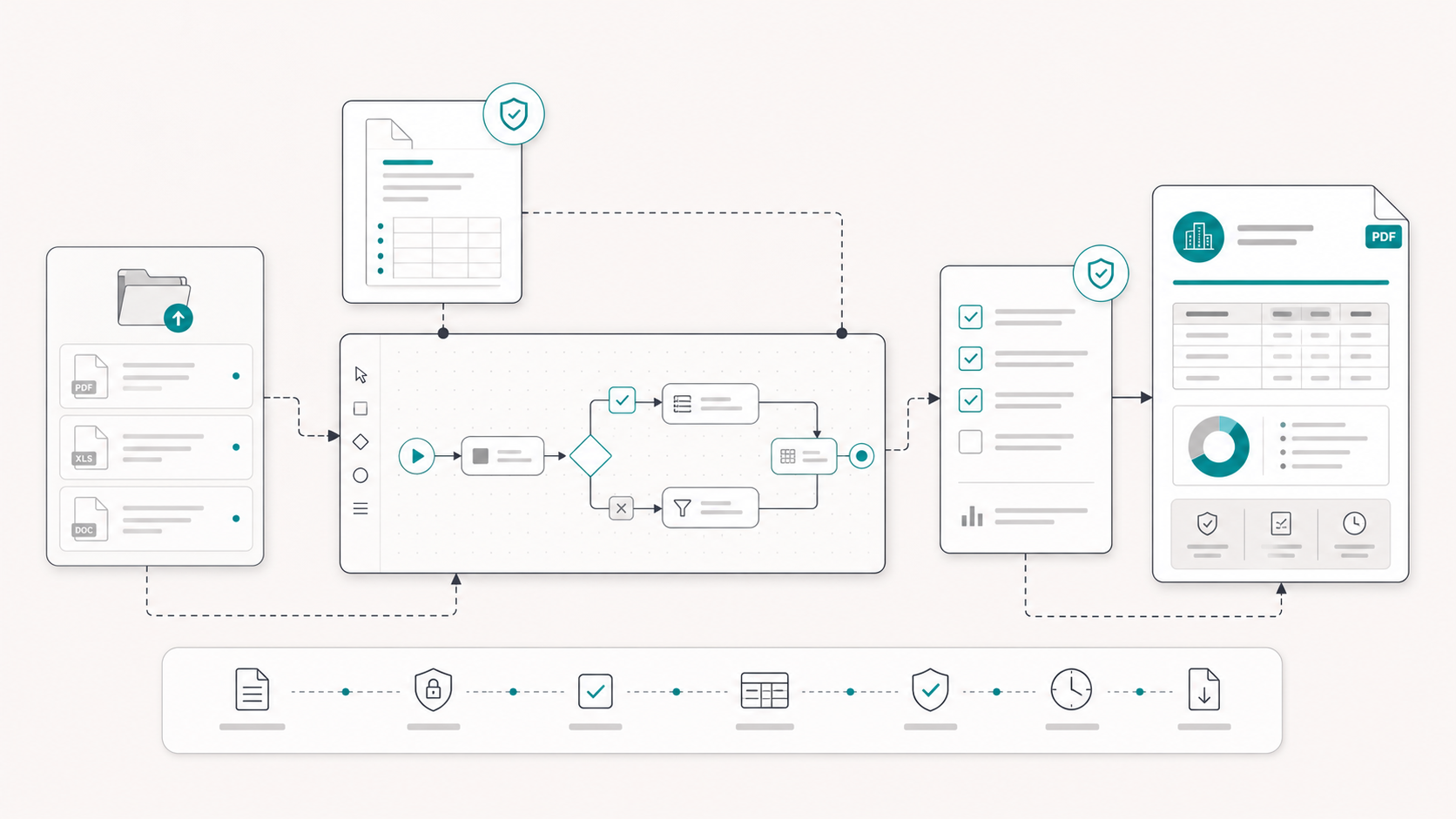
Every useful custom workflow begins with a process audit, even if it is informal. What files arrive? Who reviews them? What does the team produce at the end? What gets sent to the next person, committee, or system?
Without that map, AI becomes a writing assistant attached to a process it does not understand. With that map, AI becomes a structured step inside a repeatable workflow — one that knows what to extract, what to compare, what to flag, and what format the result must take.
- Input types — which documents, forms, or folders the workflow expects
- Review stages — who inspects what, and at which point in the process
- Output format — PDF report, Excel matrix, PowerPoint deck, checklist, or internal template
- Terminology — company-specific labels, section names, and classification rules
- Boundaries — what the system may draft or infer vs. what requires human sign-off
The workflow matters more than the prompt
Prompts are useful for exploration. Workflows are useful for production. A one-off prompt can produce a good answer once. A workflow produces a consistent deliverable every time the same type of work arrives.
In practice, that means encoding more than instructions. It means encoding structure: expected upload fields, required sections, comparison logic, evidence rules, and output schemas. The prompt becomes one layer inside a larger system — not the system itself.
Teams that treat prompt engineering as the whole solution often hit a ceiling quickly. The output varies too much. Different reviewers get different formats. Important gaps are handled inconsistently. Evidence is sometimes cited, sometimes not. The AI feels helpful in demos but unreliable in daily use.
Workflow-first design solves a different problem. It makes the AI behave like part of the operating process, not like a clever side tool.
Templates change the output quality
One of the fastest ways to improve custom AI output is to stop accepting free-form text as the final product. Teams rarely want "AI prose." They want output that fits how they already work.
That may mean PowerPoint slides in a company template. An Excel workbook with predefined tabs and validation rules. A PDF report with fixed headings and review notes. A briefing note formatted for a committee pack. A structured table comparing candidates, bidders, or contract sections.
Templates do more than improve appearance. They improve review speed. Reviewers know where to look. Comparisons become easier. Missing sections become visible. Outputs can be archived, reused, and compared across cases without manual reformatting.
- Slides — candidate evaluations, board briefings, or internal summaries in a company deck format
- Excel — review matrices, scoring tables, form-based checks, or repeatable spreadsheet workflows
- PDF reports — evaluation reports, completeness reviews, contract summaries, or assessment outputs
- Structured tables and briefs — comparison outputs, issue lists, obligation maps, or source-linked notes
Review logic needs to be explicit
Custom workflows fail when review expectations are vague. Teams need to define what the system is allowed to do automatically and what must remain with a human reviewer.
That includes extraction (what facts can be pulled from source files), comparison (how bidders, clauses, or candidates are matched against criteria), flagging (what counts as missing, weak, or unclear), and drafting (what the system may suggest but not finalize).
Explicit review logic also means separating layers in the output: extracted information, inferred interpretation, and reviewer judgment should not be blended into one undifferentiated block of text. The more high-stakes the workflow, the more important that separation becomes.
- Define what the workflow may extract directly from source documents
- Define what it may compare, score, or classify
- Define what it must flag for human inspection
- Define what it may draft but not finalize
- Define what must never be automated without reviewer sign-off
Context is not optional
Generic AI knows language. Custom workflows need domain context: the company's templates, prior examples, terminology, policy references, review rubrics, and source material that defines what "good" looks like.
Context can come from uploaded documents, approved examples, structured rules, or predefined fields that tell the system what kind of case it is handling. The more precisely the workflow understands the case type, the less rework the team has to do after generation.
This is especially true in repetitive environments — procurement evaluations, HR candidate reviews, contract codification, internal compliance checks — where the process is stable even when the documents change.
What we got wrong early on
Early custom projects often overestimated how much reviewers would tolerate unstructured output. A strong narrative summary feels impressive in a meeting, but reviewers still ask practical questions: Where is the evidence? Why is this section missing? How do I compare this case to the last one?
We also underestimated how much time teams spend reformatting. If the AI output does not match the internal template, the team still does the last mile manually — which erodes ROI quickly.
Another early mistake was treating every use case as a chat problem. Some workflows belong in authenticated platform flows with defined uploads and standardized outputs. Others fit better as embedded agents inside approved AI tools. The delivery model matters as much as the logic.
Takeaway
The most useful custom AI workflows are built around process design, context, templates, and review boundaries — not around a single clever prompt.
If you are scoping a custom AI project, start by defining the deliverable. Then map the inputs, review steps, and output format. Only then choose the model, delivery model, and workflow logic.
The organizations that succeed with custom AI are not trying to replace their process with a chatbot. They are trying to encode their process into a repeatable system that produces outputs their teams can actually use.
Related resource
Lessons from building custom AI workflows around real company processes — templates, review rules, upload logic, and the output formats teams actually use.